
Diode Review 2026: The Free 3D Circuit Simulator That’s Replacing Your Electronics Lab
⚠️ Update May 2026: withdiode.com is currently offline. The site went viral on Hacker News in April 2026 and has been unavailable since. If you’re looking for a working alternative right now, scroll to the bottom of this article — we’ve added a full section on the best replacement available today.
If you’ve ever wanted to build a circuit on a breadboard, program an Arduino, and watch your creation come alive — all without spending a cent on components or downloading anything — Diode is built exactly for that.
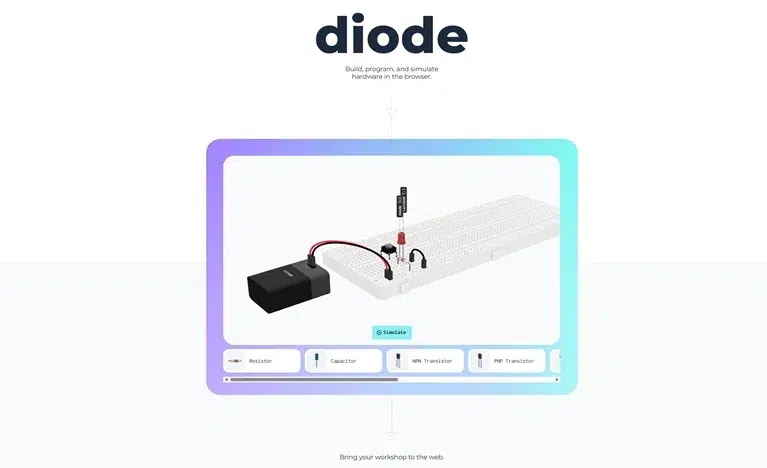
Diode is a free, browser-based 3D hardware simulator that lets you design, wire, program, and simulate electronic circuits directly in your web browser. Think of it as a virtual electronics workbench: you drag real-looking components onto a breadboard, connect them with wires, write Arduino code, hit “Simulate,” and watch LEDs blink, motors spin, and capacitors charge in real time.
In a world where Multisim Live is shutting down in September 2026 and Tinkercad’s circuit features have stagnated, Diode arrives as a breath of fresh air for students, hobbyists, educators, and anyone prototyping electronics projects without physical hardware.
Let’s break down everything this tool offers, who it’s for, and how it compares to the alternatives.
What Is Diode and How Does It Work?
Diode — accessible at withdiode.com — is a 3D hardware simulator that runs entirely in the browser. No downloads, no plugins, no Java applets. You open the site, sign up for free, and start building.
The core experience revolves around a virtual breadboard. Unlike schematic-based simulators (like CircuitLab or Falstad), Diode presents your circuit as it would look on a real workbench. Components have physical shapes: resistors show color bands, LEDs glow, transistors have their actual package form, and the 555 timer chip sits on the breadboard exactly as it would in your hands.
Key Features at a Glance
Component Library: Diode supports resistors, capacitors, NPN and PNP transistors, LEDs, 555 timer ICs, tactile switches, wires, motors, and — crucially — the Arduino Uno. The library is focused rather than sprawling, covering the components most commonly used in educational and hobbyist projects.
Arduino Programming & Simulation: This is where Diode distinguishes itself from pure circuit simulators. You can write Arduino sketches directly in the browser and simulate them running on a virtual Arduino Uno. The code interacts with the circuit in real time — toggle a switch and watch your sketch respond; adjust a component and see the output change.
Real-Time 3D Simulation: Hit the “Simulate” button and the circuit comes alive. You can observe voltages, currents, and logic states visually. LEDs light up, motors respond, and timing circuits oscillate just as they would on a physical bench.
Community Projects: Diode features an “Explore” section where users share their projects. This functions as both a learning resource and an inspiration gallery — you can browse what others have built, fork their projects, and modify them.
Zero Friction: There is no software to install, no account required to explore (though you’ll want one to save projects), and the interface loads quickly in any modern browser. This makes it particularly valuable in educational environments where installing software on lab computers is often restricted.
Who Is Diode Built For?
Students Learning Electronics
Whether you’re taking your first course in circuit theory or building your graduation project, Diode provides a risk-free sandbox. You can experiment with NPN transistor biasing, build an astable multivibrator with a 555 timer, or prototype an Arduino-controlled LED sequence — all without burning out a single component.
The 3D breadboard view is especially valuable for beginners because it mirrors the real-world building experience. When you transition from Diode to a physical breadboard, you already understand the layout.
Educators and STEM Teachers
Diode is free, runs in the browser, and requires no IT department involvement. Students can access it from any device — Chromebooks, tablets, home computers. Teachers can share project links for assignments, and students can submit their circuits as URLs.
This solves several chronic problems in electronics education: limited lab hours, expensive components, safety concerns with younger students, and the logistical nightmare of maintaining physical lab equipment.
Hobbyists and Makers
If you’re the kind of person who has an idea for a project at midnight but your workbench is in the garage, Diode lets you prototype instantly. Validate your circuit concept, test your Arduino code, and confirm your component choices before ordering anything.
Multisim Live Refugees (A Timely Opportunity)
NI’s Multisim Live — the popular online circuit simulator — is officially shutting down on September 15, 2026. Monthly subscriptions end August 1, 2026, and after the shutdown date, access to saved designs is not guaranteed. This is leaving thousands of students and educators scrambling for alternatives.
Diode fills this gap elegantly for users who need browser-based simulation with visual, interactive feedback. While Multisim Live was more SPICE-oriented and professional, Diode’s strength lies in its intuitive 3D interface and Arduino integration — making it arguably better suited for the educational users who formed Multisim Live’s core audience.
Diode vs. The Competition: How Does It Compare?
Understanding where Diode fits in the simulator landscape requires comparing it to the major alternatives.
Diode vs. Tinkercad Circuits
Tinkercad (by Autodesk) has been the default recommendation for beginners for years. It also offers a 3D breadboard view and Arduino simulation. However, Tinkercad’s circuit features have seen minimal updates recently, and users frequently report slow performance and simulation lag.
Diode offers a similar 3D breadboard concept but with a more modern, focused interface. Tinkercad bundles 3D modeling, code blocks, and circuits into one platform, which can feel cluttered when you only need circuit simulation. Diode’s singular focus on hardware simulation means a cleaner, faster experience.
Where Tinkercad wins is in its massive existing user base and extensive tutorial ecosystem. Where Diode wins is in interface speed, simulation quality, and a community-first approach to project sharing.
Diode vs. Wokwi
Wokwi is arguably the most advanced Arduino simulator available, supporting ESP32, STM32, Raspberry Pi Pico, and more. It offers VS Code integration, CI/CD pipeline simulation, and an enormous component library.
For pure Arduino development with advanced microcontrollers, Wokwi is hard to beat. But Wokwi is not breadboard-based in the visual sense — it uses a diagrammatic layout rather than a 3D workbench. If you want the experience of physically building a circuit on a breadboard (which is invaluable for learning), Diode’s 3D approach has a clear advantage.
Diode vs. CircuitLab
CircuitLab is a professional-grade schematic capture and simulation tool. It’s excellent for engineers who need accurate SPICE-level analysis, frequency response, and precise component modeling.
Diode is not trying to compete at this level. CircuitLab is a professional tool; Diode is an educational and prototyping tool. If you need to analyze the frequency response of a filter network, use CircuitLab. If you want to build a blinking LED circuit on a virtual breadboard and learn how transistors work, use Diode.
Diode vs. Falstad Circuit Simulator
The Falstad simulator is a beloved classic — free, fast, and running directly in the browser since the early 2000s. Its strength is in animated current flow visualization on schematic diagrams.
Falstad operates entirely in 2D schematic mode. It’s fantastic for understanding circuit theory at a conceptual level but doesn’t teach you how to physically build circuits. Diode bridges this gap by showing you what the circuit actually looks like on a breadboard.
Getting Started with Diode: A Quick Tutorial
Step 1: Access the Simulator
Navigate to withdiode.com and click “Sign Up” (it’s free). You can also explore community projects without an account.
Step 2: Place Components
Select components from the sidebar. Start simple: a battery, a resistor, and an LED. Drag them onto the virtual breadboard. Each component snaps to the breadboard grid, just as it would in reality.
Step 3: Wire Everything Up
Use the wire tool to connect components. The breadboard’s internal connections work exactly like a real one — the center rows are connected in groups of five, and the power rails run the full length of the board.
Step 4: Simulate
Click the “Simulate” button. If your circuit is wired correctly, you’ll see the LED light up. Adjust the resistor value to see how it affects the LED brightness.
Step 5: Add an Arduino
For more advanced projects, drop an Arduino Uno onto the workspace. Open the code editor, write a simple blink sketch, and simulate. The Arduino interacts with the circuit in real time.
Practical Project Ideas to Try on Diode
Here are some starter projects that demonstrate the tool’s capabilities:
LED Blinker with Arduino: The classic “Hello World” of electronics. Program the Arduino to toggle an LED on and off at one-second intervals. Great for verifying your setup works.
555 Timer Astable Multivibrator: Build a classic oscillator circuit using the 555 timer IC. Watch the output pulse on and off, driving an LED. Experiment with resistor and capacitor values to change the frequency.
Traffic Light Controller: Use an Arduino with three LEDs (red, yellow, green) to simulate a traffic light sequence. A great beginner project that teaches digital outputs and timing.
Transistor Switch Circuit: Use an NPN transistor as a switch to control a motor or LED from an Arduino digital pin. This teaches the fundamental concept of transistor amplification.
Push-Button Toggle: Wire a tactile switch to an Arduino input and program a toggle function — press once to turn on, press again to turn off. This teaches debouncing and state management.
Strengths and Limitations
What Diode Does Well
The 3D breadboard experience is Diode’s strongest differentiator. No other free, browser-based simulator makes circuit building feel this tangible. The Arduino integration adds a programming dimension that pure circuit simulators lack. And the zero-install, zero-cost barrier means anyone can start immediately.
The community projects section adds educational value — being able to see, fork, and modify real projects accelerates learning in a way that documentation alone cannot.
Current Limitations
Diode’s component library is more focused than competitors like Tinkercad or Wokwi. You won’t find ESP32 boards, OLED displays, or sensors like accelerometers. For projects requiring specialized components, you may need to complement Diode with another tool.
The platform is still growing, which means the community is smaller than Tinkercad’s or Wokwi’s. Fewer projects to browse and fewer community answers when you get stuck. However, this also means there’s an opportunity to be an early contributor.
Advanced SPICE-level analysis is not available. If you need precise frequency domain simulation or detailed transistor modeling, this is not the right tool.
The Verdict: Should You Use Diode?
Diode occupies a sweet spot in the simulator ecosystem. It’s more visual and intuitive than schematic-based tools like CircuitLab or Falstad, more focused than Tinkercad’s everything-in-one approach, and more beginner-friendly than Wokwi’s developer-oriented platform.
Use Diode if:
- You’re learning electronics and want to build circuits visually on a 3D breadboard
- You teach electronics and need a free, no-install tool your students can access from any device
- You want to prototype Arduino projects quickly before buying components
- You’re migrating from Multisim Live and need a browser-based alternative
- You value simplicity over an overwhelming number of features
Consider alternatives if:
- You need ESP32, STM32, or Raspberry Pi Pico simulation (try Wokwi)
- You need professional SPICE analysis (try CircuitLab or LTspice)
- You need PCB design capabilities (try EasyEDA)
For anyone stepping into the world of electronics — or teaching others to do so — Diode is one of the best starting points available in 2026. And since it’s free and runs in your browser, the only investment required is your curiosity.
Try Diode free at withdiode.com
FAQ: Common Questions About Diode Circuit Simulator
Is Diode completely free?
Yes. Diode is free to use with a browser-based interface. You can sign up at no cost to save and share projects.
Do I need to install anything to use Diode?
No. Diode runs entirely in your web browser. No downloads, plugins, or extensions are required.
Can I simulate Arduino code on Diode?
Yes. Diode supports Arduino Uno simulation. You can write sketches in the built-in editor and simulate them interacting with your circuit in real time.
What components does Diode support?
Diode includes resistors, capacitors, NPN and PNP transistors, LEDs, motors, 555 timer ICs, tactile switches, wires, breadboards, and Arduino Uno boards.
Is Diode a good replacement for Multisim Live?
For educational and hobbyist use, yes. Diode’s browser-based, free 3D simulation covers the visual prototyping needs that many Multisim Live users relied on. For professional SPICE analysis, you may want to consider the desktop NI Circuit Design Suite or LTspice.
Can I use Diode on a Chromebook or tablet?
Yes. Since Diode runs in the browser, it works on Chromebooks, iPads, Android tablets, and any device with a modern web browser.
How does Diode compare to Tinkercad for circuit simulation?
Both offer 3D breadboard views and Arduino support. Diode is more focused on circuit simulation specifically, while Tinkercad includes 3D modeling and block coding. Diode tends to offer a faster, more streamlined experience for pure circuit work.
Update May 2026: Withdiode is Offline — The Best Alternative Right Now
Withdiode went viral on Hacker News in April 2026 and has been offline ever since. The site is currently unavailable with no official statement from the team about a return date.
If you landed on this article looking for a working 3D circuit simulator in the browser, the best replacement available today is Tinkered (tinkered.ai).
Tinkered does everything Withdiode did — 3D breadboard simulation, Arduino support, no download, no install, free — and adds features Withdiode never had:
- AI circuit generation: describe your project in plain English and Tinkered builds the wiring, picks the components, and writes the firmware for you
- Real SPICE physics: actual analog simulation, not just visual — resistors, capacitors, transistors, and op-amps behave like real components
- ESP32 support: simulate ESP32 projects directly in the browser, something Withdiode never supported
- Hardware deployment: one click flashes your firmware to Arduino, ESP32, Raspberry Pi Pico, or any of 1,300+ supported boards
It is currently free during beta with no credit card required.
We have published a full review of Tinkered covering everything you need to know to get started: Tinkered Review: The Best Free Alternative to Withdiode in 2026 →


connect a motor and battery and button
very good
me gusta mucho
a student learning to know electronic and to be an engineer