Looking for an ESP32 simulator you can open right now, with no account and nothing to install? Learn ESP32 is a free browser-based simulator with 20 interactive 3D lessons. Each one is a small ESP32 project for beginners: you see the circuit, the code and the serial monitor running together.
It was designed by Dilum Sanjaya. I went through it lesson by lesson, and below I show you how it works, which projects it covers and how to move the code to a real board afterwards.
How this ESP32 simulator works
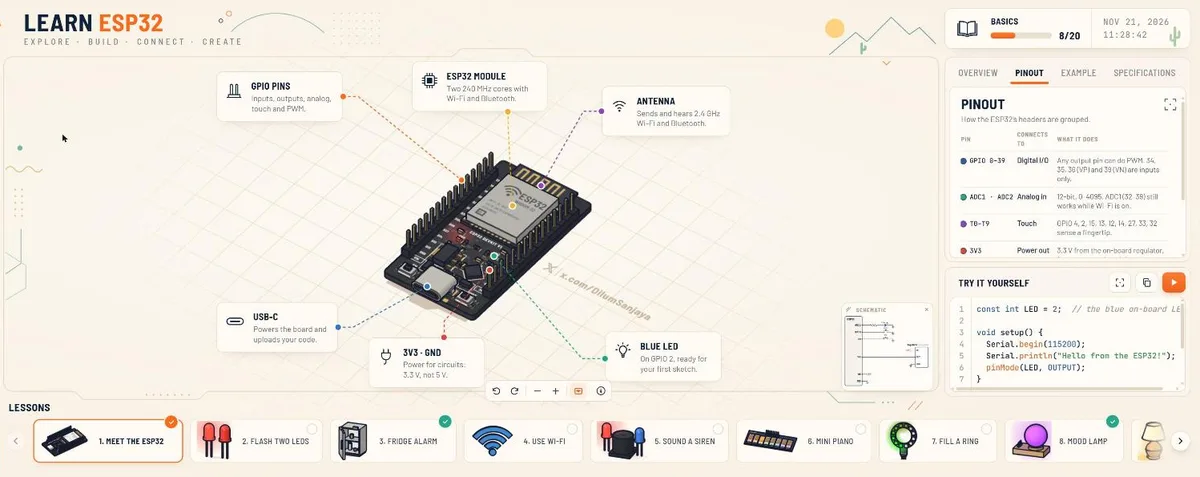
Every lesson builds a 3D circuit (an ESP32 DevKit, a breadboard, wires and parts) and, when you press ▶ in Try it yourself, runs that lesson’s program:
- The line being executed is highlighted in the code panel.
- The serial monitor opens. It first shows the compile and upload messages («Connecting to ESP32 on USB… Writing 100 %») and then the program’s own output.
- The circuit comes alive: LEDs light up, servos turn, the OLED screen draws.
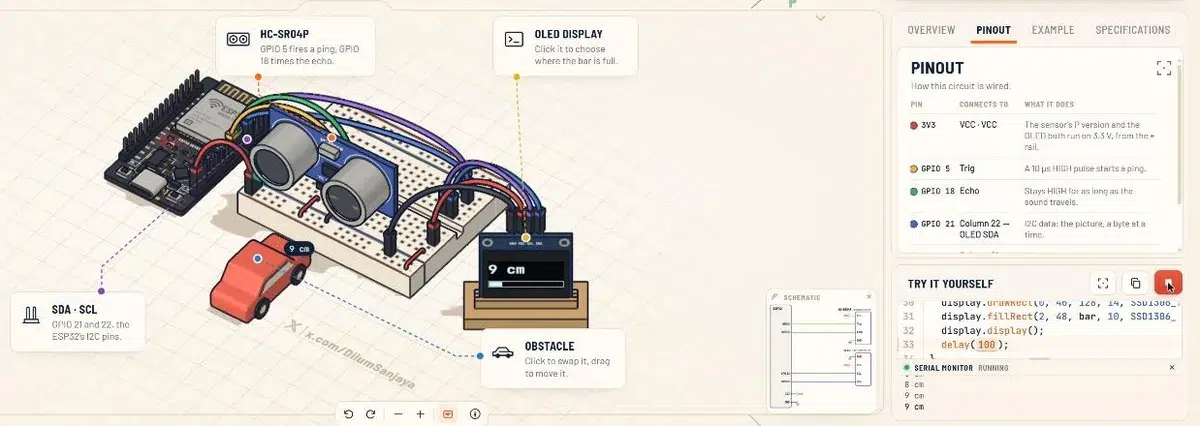
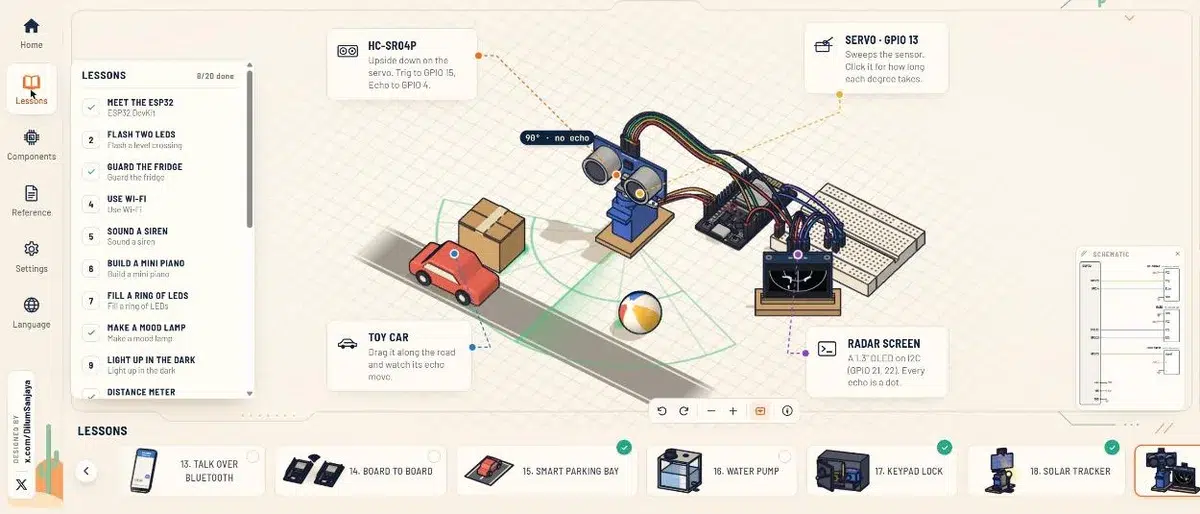
The part I like most is that the scene reacts to you. In the distance meter you drag the obstacle and the OLED updates. In the radar you push a toy car along the road. In the keypad lock you type the code on the keys.
What I checked myself:
- Free, no sign-up. Your progress is stored in your own browser.
- 20 interface languages, switchable from the side menu.
- Arduino-style code (
pinMode,digitalRead,Serial…) with a copy button. You don’t edit the code on the site: you read it, run it and copy it. - Four tabs per lesson:
- Overview: explains the circuit and the idea of the lesson.
- Pinout: each pin, what it connects to and what it does.
- Example: the code explained step by step.
- Specifications: data about the parts, such as the sensor or the servo.
- A small schematic window next to the code.
20 ESP32 projects for beginners, grouped by skill
Here is the full list from the lessons menu, grouped by what you actually learn in each one.
The basics (lessons 1 to 3)
- Meet the ESP32. The DevKit board: two cores up to 240 MHz, Wi-Fi and Bluetooth on one chip, USB-C, and the rule that saves boards: 3.3 V on every pin, not 5 V.
- Flash two LEDs. A level-crossing light: digital outputs and delays.
- Guard the fridge. A reed switch with
INPUT_PULLUPandmillis()to time how long the door has been open.
Sound, light and analog inputs (lessons 5 to 9)
- Sound a siren with
tone()and aforloop. - Build a mini piano from eight capacitive touch pins and
touchRead(). - Fill a ring of LEDs with a potentiometer read by the 12-bit ADC (0 to 4095).
- Make a mood lamp with an RGB LED and three buttons.
- Light up in the dark with a photoresistor (LDR).
Distance and motion (lessons 10 to 12)
- Distance meter with an HC-SR04P ultrasonic sensor,
pulseIn()and an I2C OLED display. - Drive a wheel both ways with an H-bridge motor driver and PWM.
- Laser barrier gate: when a car breaks the beam, a servo lifts the barrier.
Wireless (lessons 4, 13 and 14)
- Use Wi-Fi: the ESP32 serves a small web page and you toggle an LED from your phone.
- Talk over Bluetooth with
BluetoothSerialand a Bluetooth terminal app. - Board to board with ESP-NOW: two ESP32 boards message each other with no router.
Full ESP32 projects (lessons 15 to 20)
- Smart parking bay: distance sensor, traffic light and a free/taken status on your phone over Wi-Fi.
- Automatic water pump: a level probe and a relay that starts and stops a pump.
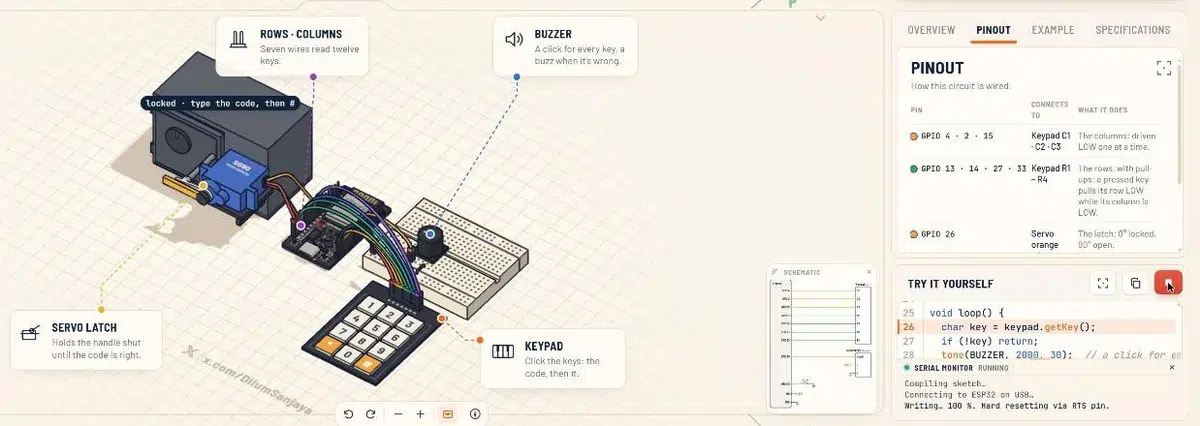
- Keypad door lock: a 12-key keypad and a servo latch that opens with the right code.
- Sun-tracking solar panel: two light sensors and a servo that turns the panel toward the light.
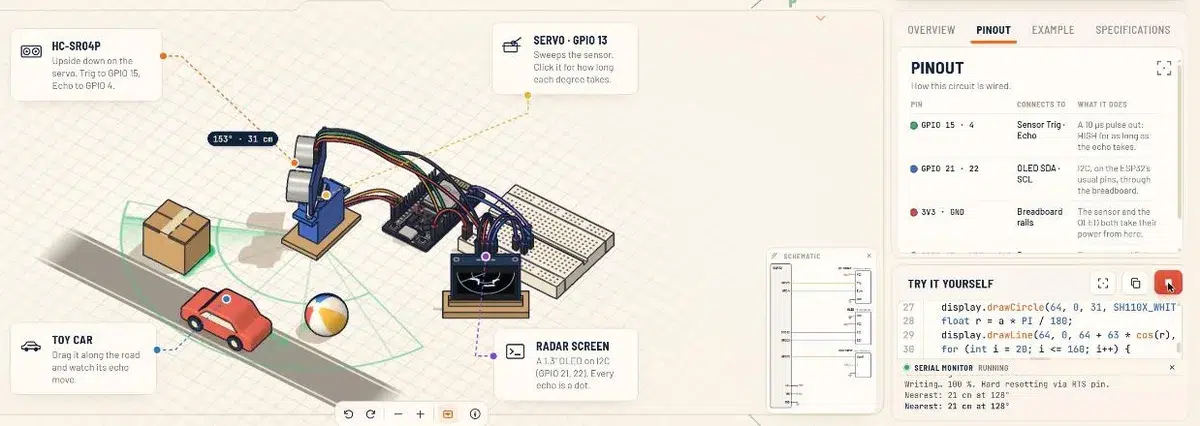
- Ultrasonic radar: the HC-SR04P on a servo sweeps degree by degree and the OLED plots every echo. This is the one I show people who ask what an ESP32 can do.
- Pick and place with a stepper motor (200 steps per turn) on a lead screw and an electromagnet, like one axis of a small CNC machine.
My take as an engineer: who it’s for
I work with industrial automation and design electrical panels, so with any simulator I ask two questions: what it saves you, and what it can’t teach you.
It’s a great fit if:
- You want to learn the ESP32 and understand what every pin does before buying parts.
- You teach electronics and need something free, visual and install-free.
- You know Arduino and want to see what the ESP32 adds: Wi-Fi, Bluetooth, ESP-NOW, touch pins and a 12-bit ADC.
It’s not the right tool if:
- You need a free-form ESP32 simulator to build your own circuit and write your own code. Here the lessons are fixed and the code is read-only on the site.
- You need to debug real hardware: sagging power supplies, noise, switch bounce, 5 V signals that must never reach a 3.3 V pin. You only learn that with the board on your bench.
A safety note from someone who builds panels. The water pump lesson switches a mains-powered pump through a relay. In the simulation nothing can go wrong. In real life that’s mains voltage: use a proper relay module, keep the ESP32’s low-voltage side well separated from the power side, and if you haven’t worked with mains before, get someone who has.
Next step: run the code on a real ESP32
- Copy the lesson’s code with the copy button.
- Open it in the Arduino IDE with ESP32 board support installed and select your board.
- Wire the circuit from the Pinout tab and check that your parts work at 3.3 V. That is why the site uses the HC-SR04P, the version that runs at 3.3 V.
- Open the serial monitor at the baud rate in the code (115200 in lesson 1) and compare what you see with the simulation.
No board yet? My guide to buying your first Arduino kit explains what to look for. For background, read about the ESP as an alternative to Arduino boards and how microcontrollers work.
Want a 3D circuit simulator instead?
Learn ESP32 is focused on guided ESP32 lessons. If you’d rather build your own circuits on a virtual breadboard, see my review of Tinkered.ai, a 3D circuit simulator. It’s the one I use now that Diode is offline. For circuit theory with animations, there’s EveryCircuit. When you’re ready to design your own board, Fritzing and KiCad are the next step.
All the electronics tools I recommend are on my recommended page, in the Electronics and simulators section.
FAQ
Is there an ESP32 simulator online for free?
Yes. Learn ESP32 is a free online ESP32 simulator with 20 guided lessons. It runs each lesson’s code, shows the serial monitor and animates the circuit in 3D, with no sign-up and no payment.
What can you build with an ESP32?
Alarms, distance meters, motor and servo control, things you switch from your phone over Wi-Fi or Bluetooth, and boards that talk to each other with ESP-NOW. The 20 lessons in Learn ESP32 are a good list of ideas.
What is the difference between Arduino and ESP32?
The ESP32 is programmed with the same Arduino-style code and the Arduino IDE, but it runs at 3.3 V and adds Wi-Fi, Bluetooth, capacitive touch pins and a 12-bit ADC on the same chip.
Which ESP32 pins are input only?
On the ESP32, GPIO 34, 35, 36 and 39 can only be used as inputs. The Pinout tab in Learn ESP32 shows this, along with the analog and touch pins.
Can I upload the simulator’s code to my own ESP32?
Yes. Copy it, open it in the Arduino IDE, wire the circuit from the Pinout tab and upload it. Check the libraries each lesson includes first: the solar tracker, for example, uses ESP32Servo.
Keep learning
Grab the free schematics, guides and diagrams in my free resources repository (most of them are in Spanish), and check my recommended tools for electronics and home automation.